Before it goes live, you should be able to click on it
I use AI to write most of my code. Cursor, Claude, the whole stack. I ship faster than I ever have.
I also use AI to write most of my tests. Which means my tests might be wrong in exactly the same ways my code is wrong. The AI imagines the happy path, writes tests for the happy path, and if the happy path is subtly broken — the tests still pass.
The only check I actually trust is: does the app work? Not "does CI say it works." Does it actually work. Can I click through it. Can I use it. And — just as important — is it actually what I needed, not just what I asked for.
So I built a pipeline where that's literally the last step before anything ships. Every push to main that passes all the automated gates ends with a live preview of the exact production candidate, deployed and smoke-tested, waiting for me to look at it. I merge when I'm satisfied. Nothing ships without that.
Here's how it works, concretely enough that you could build it yourself.
If you want a simpler starting point — no Docker, no GCP, just Netlify — the pipeline for this very site is public at github.com/windyroad/windyroad.
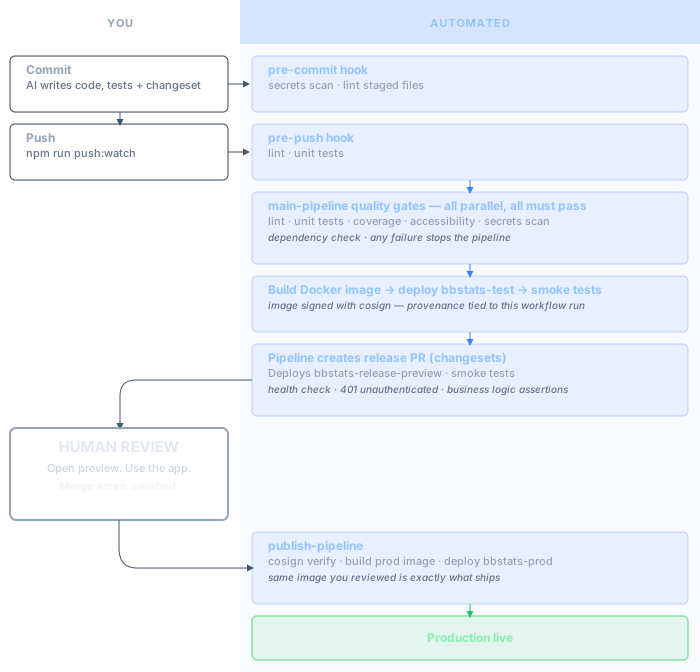
The diagram above shows the Netlify static-site version of this pipeline. The detailed code examples later in this post show the full GCP/Docker version used in bbstats.
The branch strategy
Three things to understand:
main is the trunk. This is where all development happens. Pushes here trigger the main pipeline — quality gates, automated tests, build, deploy to a test environment. If everything passes, the pipeline prepares a release. If it doesn't, nothing downstream happens.
publish is the release branch. The only way code gets here is via a release PR that the pipeline creates automatically. Pushing to publish triggers the publish pipeline, which builds the production image and deploys to prod.
changeset-release/publish is a working branch managed by the Changesets tool. When you have unreleased changes tracked by a changeset file, this branch holds the auto-generated release commit (version bump, CHANGELOG update). The release PR goes from this branch into publish.
You never push to publish manually. You never push to changeset-release/publish at all — the pipeline owns it.
Changesets: tracking what's in the release
Changesets gives you a way to describe changes as you make them, separate from committing code. When I ask Claude or Cursor to implement something, I include "create a changeset for this" in the prompt. The AI creates a markdown file in .changeset/ — something like .changeset/foul-turnover-subtypes.md — that describes what changed and whether it's a patch, minor, or major bump:
---
"bbstats": patch
---

Add foul turnover subtypes to the event model
That file gets committed alongside the code. When the pipeline runs changeset version, it reads all pending changeset files, bumps the version in package.json, rolls the descriptions into CHANGELOG.md, and deletes the individual files.
This happens automatically on the release branch. Neither you nor the AI runs it manually — the pipeline owns that step.
The practical effect: the release PR shows you exactly what's in the release, described in plain language, because the AI that wrote the code also wrote the release note. The whole loop — code, tests, changeset — is AI-generated. The pipeline turns it into a deployable release candidate. You decide whether to ship it.
The main pipeline: gates, then a release PR
When you push to main, the main pipeline runs a battery of checks in parallel: lint, unit tests, app correctness gate (coverage and test obligation), accessibility gate, dependency security check, secrets scan, and several domain-specific gates. If any of them fail, the pipeline stops. (The minimal Netlify version linked above runs: lint, dependency freshness, secrets scan, build, accessibility gate, and smoke tests.)
If they all pass and the change touches app code, the pipeline builds and deploys to a test service, then runs smoke tests against it. If those pass, the final step creates (or updates) the release PR:
- name: Create changesets release PR to publish
  id: changesets
  uses: changesets/action@8eb63fb4cfc7f9643537c7d39d0b68c835012a19
  with:
    publish: echo "publish handled by publish-pipeline"
    version: npm run changeset:version
    commit: "pipeline: release"
    title: "pipeline: release"
    createGithubReleases: false
    branch: publish
  env:
    GITHUB_TOKEN: ${{ secrets.GITHUB_TOKEN }}
The changesets action checks whether there are unreleased changeset files. If there are, it creates or updates a PR from changeset-release/publish into publish. If there's nothing unreleased, it does nothing.
The pipeline then immediately triggers the preview workflow on that PR:
- name: Trigger release PR checks
  if: steps.changesets.outputs.pullRequestNumber
  run: |
    PR_NUMBER="${{ steps.changesets.outputs.pullRequestNumber }}"
    PR_HEAD_SHA="$(gh pr view "$PR_NUMBER" --json headRefOid --jq '.headRefOid')"
    gh workflow run release-pr-preview.yml \
      --ref changeset-release/publish \
      -f pr_head_sha="$PR_HEAD_SHA" \
      -f pr_number="$PR_NUMBER"
  env:
    GH_TOKEN: ${{ secrets.GITHUB_TOKEN }}
Gotcha:
actions: writepermission required. The job that runsgh workflow runneedsactions: writedeclared explicitly in itspermissionsblock. Without it, you get a silent HTTP 403 — the step appears to succeed but the workflow dispatch never happens.
The preview: your actual production candidate, deployed
The release-pr-preview.yml workflow does three things:
1. Build and push the candidate image
- name: Build and push preview image
  run: |
    IMAGE="${{ vars.GCP_REGION }}-docker.pkg.dev/${{ vars.GCP_PROJECT_ID }}/bbstats/bbstats:${{ github.sha }}-pr${{ github.event.pull_request.number }}"
    docker build -t "$IMAGE" .
    docker push "$IMAGE"
    IMAGE_REF="$(docker inspect --format='{{index .RepoDigests 0}}' "$IMAGE")"
    echo "image_ref=$IMAGE_REF" >> "$GITHUB_OUTPUT"
Note IMAGE_REF: this is the image identified by its content digest, not the mutable tag. This matters. The same digest that gets deployed to the preview is what gets re-verified before production.
2. Deploy to a live preview service
- name: Deploy release PR preview service
  run: |
    gcloud run deploy bbstats-release-preview \
      --image "$IMAGE_REF" \
      --region "${{ vars.GCP_REGION }}" \
      --allow-unauthenticated \
      --set-env-vars "BUILD_SHA=${{ github.sha }},BBSTATS_AUTH_MODE=google_oidc,..."
This is the same Cloud Run configuration as production — same memory, same service account, same auth setup. The only difference is the service name. It's publicly accessible so I can open it on my phone.
3. Smoke test the running preview
The smoke tests don't just check if the server is up. They check things the app is supposed to actually do.
bbstats is a live basketball stats app that processes natural-language voice commands and projects game state in real time. The smoke test sends a known sequence of commands — a checkpoint, a lineup change, a scoring event — and asserts specific values in the response:
- name: Smoke-test release preview
  run: |
    # Health check returns the right build SHA — this is actually deployed, not stale
    HEALTH_JSON="$(curl -fsSL "$URL/health")"
    ACTUAL_BUILD_SHA="$(echo "$HEALTH_JSON" | jq -r '.buildSha // empty')"
    [ "$ACTUAL_BUILD_SHA" = "${{ github.sha }}" ]

    # Unauthenticated API request returns 401, not 500 or 200
    UNAUTH_STATUS="$(curl -sS -o /dev/null -w "%{http_code}" \
      -H "content-type: application/json" \
      -d '{"utterances":[]}' "$URL/api/project")"
    [ "$UNAUTH_STATUS" = "401" ]

    # Known input → expected output (regression check on core logic)
    PROBE_STATUS="$(curl -sS -o /tmp/smoke-probe.json -w "%{http_code}" \
      -H "authorization: Bearer $ID_TOKEN" \
      -d '{"seed":"live-ops-synthetic","utterances":["checkpoint 2:34 46 48","lineup 13,14,5,4,7","two point made 13"]}' \
      "$URL/api/project")"
    [ "$PROBE_STATUS" = "200" ]
    [ "$(jq -r '.projection.score.us' /tmp/smoke-probe.json)" = "48" ]
    [ "$(jq -r '.projection.score.them' /tmp/smoke-probe.json)" = "48" ]
    [ "$(jq -r '.projection.unresolvedUtterances | length' /tmp/smoke-probe.json)" = "0" ]
That last check is the one that matters most. It sends a known sequence of events and asserts specific values in the response. If a change broke how the app processes commands or calculates scores, this fails — before I've seen or merged anything.
By the time the PR shows up in GitHub as "all checks passed," the app has already been deployed and verified against known inputs.
What I actually do to release
Nothing complicated. I look at the release PR. It shows me what changesets are included — what's actually in this release. I open the preview URL. I use the app. If it looks right, I merge.
Sometimes it doesn't look right — not broken, just not what I meant. I asked for X, the AI built X, the tests verify X. But standing in front of a running version of X, I realise I needed Y. That's a product owner moment: that's what I asked for, not what I meant. There's no test that catches it, because the test was written against the same requirement that was wrong.
That's the whole human interaction. No deploy scripts. No "cross my fingers and push." Just: look at it running, decide whether it's actually what you needed, merge when satisfied.
When the PR merges, the publish pipeline runs. It re-runs the quality gates, then builds the production image. Here's the part that makes me confident: before deploying to production, it verifies the image signature with cosign:
- name: Deploy production service from immutable artifact
  run: |
    cosign verify \
      --certificate-oidc-issuer https://token.actions.githubusercontent.com \
      --certificate-identity-regexp "^https://github.com/.../publish-pipeline.yml@refs/heads/publish$" \
      "$IMAGE_REF"
    gcloud run deploy bbstats-prod --image "$IMAGE_REF" ...
The signature proves this image was built by the pipeline from the publish branch — not built locally, not pulled from somewhere else, not tampered with. The production deploy can only happen from an image the pipeline built and signed.
After production is verified, the pipeline merges publish back to main automatically. The release is done.
The local hooks: fast feedback before anything leaves your machine
The pipeline catches things at push time. The hooks catch things before that.
The setup is simple — no Husky, just .githooks/ in the repo:
git config core.hooksPath .githooks
Or in package.json so it runs on install:
"hooks:install": "git config core.hooksPath .githooks"
Pre-commit runs fast checks on staged files: secrets scan, lint on changed TypeScript files. Seconds, not minutes.
Pre-push runs the substantive checks: lint, unit tests, and a dependency security check. This takes longer, but it means if something is broken you find out before your push triggers a CI run.
The pre-push hook is the reason CI usually passes. By the time a push hits GitHub, it's already been through the same checks locally.
I also have a push:watch script that pushes and then tails the pipeline run in the terminal:
git push "$@"
# ... finds the pipeline run for the current HEAD SHA
gh run watch "$run_id" --exit-status
So npm run push:watch is: push, then watch the pipeline live. Green pipeline = release PR is being prepared. No context switching to GitHub to check.
Why this matters specifically for AI-generated code
With hand-written code, a failing test usually points to something you wrote incorrectly. You can reason about it. You have context.
With AI-generated code, a failing test might point to something the AI got subtly wrong — or to a test the AI wrote that tests the wrong thing. The code and the tests can be wrong in the same direction. Both look reasonable. Both pass review.
There's a third failure mode that's subtler than either of those. Sometimes the code is correct and the tests are correct — the implementation faithfully translates what you asked for. But what you asked for wasn't what you needed. You described X, the AI built X exactly, the tests verify X, and it wasn't until you used the running version that you noticed the problem. No test catches this, because the tests were written against the same spec that was wrong. The only check that surfaces it is using the thing — as a user would, with real data, in the actual flow.
The review environment doesn't solve all of that. But it adds checks the AI can't fake: does the app actually behave correctly when a human uses it? Is this actually what I needed? The smoke tests add determinism — known inputs, expected outputs, checked against the live deployment. The human review adds judgment — something feels off, a flow that should work doesn't, and sometimes: that's not what I meant at all.
That combination — automated correctness checks plus human review of the running app — is what I trust when I'm shipping code I didn't write entirely myself.
The three services
To make this concrete: at any given time there are three Cloud Run services.
bbstats-test deploys on every passing push to main. It proves the build is deployable before any release work starts, and it's smoke-tested as part of the main pipeline. Disposable — overwritten on every run.
bbstats-release-preview deploys on every release PR update. This is the human review environment — the actual production candidate, live and accessible. Smoke-tested before you look at it. Also disposable.
bbstats-prod deploys when the release PR merges to publish. Production. It only ever gets the cosign-verified image that was reviewed in the preview environment.
Netlify-specific notes
If you're running this pattern with Netlify rather than Cloud Run, two things will bite you.
Named alias, not deploy ID. When netlify deploy runs without --alias, the deploy URL has the form abc123--yoursite.netlify.app. That deploy-ID URL isn't routable from Azure-hosted GitHub Actions runners — your smoke tests will time out. Pass --alias <name> to get a stable, routable URL instead:
netlify deploy --dir=out --alias main-test
The deploy_url in the JSON output will then be https://main-test--yoursite.netlify.app, which works reliably from CI.
Follow redirects with -L. Netlify draft deploys redirect trailing-slash URLs (/blog/ → /blog). If you curl /blog/ without -L, you get a 301 and the smoke test fails even though the page exists. Always pass -L to follow redirects:
curl -sS -L -o /dev/null -w "%{http_code}" "$URL/blog/"
How to adapt this
The specific tools here are GitHub Actions, Cloud Run, Changesets, and cosign. You can swap most of them. The pattern is what matters:
- Gate on
main, notpublish— all your quality gates run when code lands on the trunk, before anything release-related happens - Separate the readiness decision from the release decision — the pipeline decides "this is ready to release," you decide "release it now"
- Deploy the candidate before the decision — the thing you're reviewing is the actual production artifact, not a separate staging build
- Smoke-test the live preview — by the time you look at the PR, the app has already been verified against known inputs
- Sign and verify the image — prove that what goes to production is what the pipeline built and tested
The goal is a release process where your answer to "what if this breaks something?" is: "I looked at it running. The smoke tests passed. The image is the same one I reviewed." That's a much more grounded answer than "CI was green."
And when you're shipping code that an AI wrote? You want the most grounded answer you can get.
Keep following The Shift
A practical newsletter about AI engineering, software delivery, and the systems around them.