Enforcing voice and tone with Claude Code hooks
An AI agent writes fluent prose. It also writes whatever you ask for. Tell it to add a hero section and it will produce "We're passionate about leveraging cutting-edge solutions." Tell it to write an FAQ answer and it will open with "Great question!" Neither sounds like you.
Voice consistency is a constraint, and constraints need enforcement. This system blocks the AI from editing copy until a voice-and-tone reviewer has checked the proposed changes against a written guide.
The problem
A voice guide sitting in a markdown file is documentation. The AI reads it if you tell it to, ignores it if you don't, and drifts from it when generating long passages. A guide only describes the rules. Nothing enforces them.
The failure mode is subtle. The AI won't produce obviously wrong copy. It will produce copy that's slightly off: a hedging phrase here, an "actually" there, a sentence that positions you against a competitor instead of stating what you do. Each deviation is small. Over time, the site sounds like it was written by committee.
Here is what drift looks like in practice. An AI asked to write a CTA might produce:
We'd love to help you navigate the complexities of AI integration. Reach out today to learn how our team can support your journey.
The voice guide says: state what you do, let the reader decide. The reviewed version:
I review your AI coding setup and tell you what's working and what isn't. Book a call if that's useful.
The first version is fluent. It's also generic, hedging, and sounds like every other consulting site. The reviewer catches the pattern before it ships.
Four hooks, one gate
The pattern comes from accessibility-agents, which uses the same hook architecture to enforce WCAG compliance on web UI code. I adapted it for voice and tone: same gate mechanism, different reviewer, different scope, plus a reset hook that tightens the review cycle from per-session to per-turn.
Claude Code hooks are shell scripts that fire at defined points in the AI's workflow: before a prompt is processed, before a tool is called, after a tool completes, and when the AI finishes responding. They can inject context, block actions, or react to what just happened.
The system uses four Claude Code hooks that work together. One injects the instruction. One blocks the edit. One unlocks the block. One resets the lock so the next prompt starts clean.
Here is what a typical interaction looks like. The user asks for an edit. The gate blocks it. The AI delegates to the reviewer. The reviewer finds violations. The AI incorporates the fixes, and the edit goes through:
User: Add a CTA to the pricing page

Claude: [attempts to edit src/app/pricing/page.tsx]

Hook: BLOCKED: Cannot edit copy file 'page.tsx' without voice & tone
      review. You MUST first delegate to voice-and-tone-lead.

Claude: [delegates to voice-and-tone-lead]

voice-and-tone-lead:
  VIOLATIONS FOUND
  1. [Direct voice principle] "We'd love to help you navigate the
     complexities" -- hedging. Fix: "I review your AI coding setup
     and tell you what's working and what isn't."

Claude: [incorporates fix, edits page.tsx successfully]
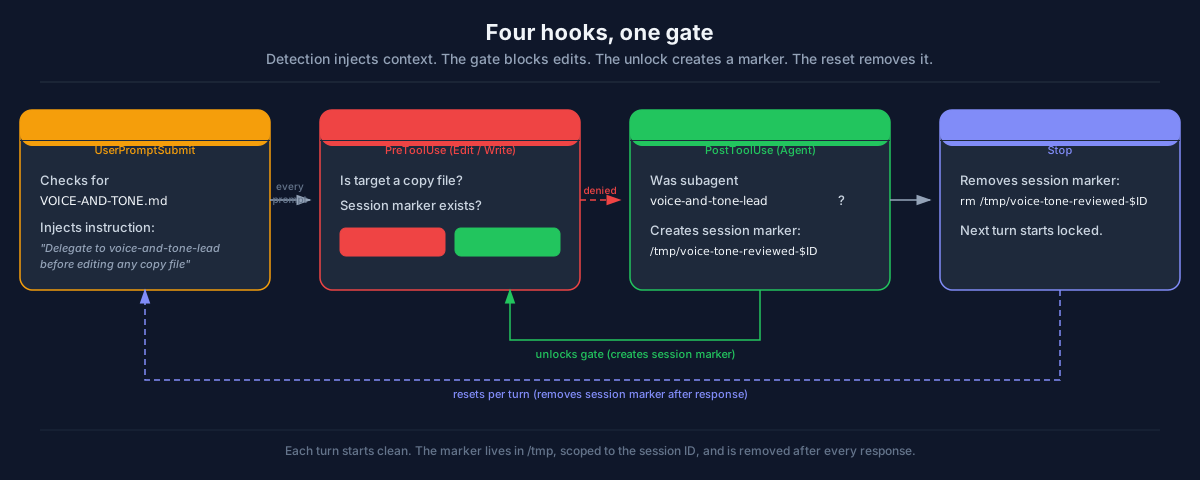
1. Detection (UserPromptSubmit)
Every prompt, a hook checks whether VOICE-AND-TONE.md exists in the project root. If it does, the hook injects an instruction into the AI's context telling it to delegate to the voice-and-tone-lead agent before editing any copy file.
if [ -f "VOICE-AND-TONE.md" ]; then
  cat <<'HOOK_OUTPUT'
INSTRUCTION: MANDATORY VOICE & TONE CHECK. YOU MUST FOLLOW THIS.
DETECTED: VOICE-AND-TONE.md exists in this project.

This is a NON-OPTIONAL instruction. You MUST use the voice-and-tone-lead agent
before editing any user-facing copy in .tsx files under src/app/ or
src/components-next/, blog articles in src/articles/, or social posts in
src/social/. This is proactive. Do not wait for the user to ask.
HOOK_OUTPUT
fi
The instruction fires on every prompt, not just prompts that mention copy. The AI doesn't always know in advance whether a task will involve editing a copy file. A prompt like "fix the broken layout on the pricing page" might require changing text. The instruction ensures the reviewer is consulted regardless.
2. The gate (PreToolUse)
The detection hook is context injection. Context can be ignored. The gate cannot.
A PreToolUse hook fires before every Edit or Write call. It checks whether the target file is a copy-bearing file (.tsx in src/app/ or src/components-next/, .md in src/articles/ or src/social/). If it is, the hook checks for a session marker file. If the marker doesn't exist, the edit is denied:
IS_COPY=false
case "$FILE_PATH" in
  */src/app/*.tsx|*/src/components-next/*.tsx)
    IS_COPY=true ;;
  */src/articles/*.md)
    IS_COPY=true ;;
  */src/social/*.md)
    IS_COPY=true ;;
esac

if [ "$IS_COPY" = false ]; then
  exit 0
fi

MARKER="/tmp/voice-tone-reviewed-${SESSION_ID}"
if [ -n "$SESSION_ID" ] && [ -f "$MARKER" ]; then
  exit 0
fi
When denied, the hook outputs JSON that Claude Code interprets as a hard block:
{
  "hookSpecificOutput": {
    "hookEventName": "PreToolUse",
    "permissionDecision": "deny",
    "permissionDecisionReason": "BLOCKED: Cannot edit copy file 'page.tsx' without voice & tone review. You MUST first delegate to voice-and-tone-lead using the Agent tool."
  }
}
The AI cannot proceed. The denial message tells it exactly what to do: delegate to voice-and-tone-lead first.
3. The unlock (PostToolUse)
After the AI calls the Agent tool, a PostToolUse hook checks whether the subagent was voice-and-tone-lead. If so, it creates the session marker:
case "$SUBAGENT" in
  *voice-and-tone-lead*)
    touch "/tmp/voice-tone-reviewed-${SESSION_ID}" ;;
esac
The marker is a file in /tmp named with the session ID. Once the voice-and-tone-lead has reviewed, all subsequent edits to copy files in that turn are unblocked.
4. The reset (Stop)
A Stop hook fires when the AI finishes responding, before control returns to the user. It removes the session marker so the next prompt requires a fresh voice review:
if [ -n "$SESSION_ID" ]; then
  rm -f "/tmp/voice-tone-reviewed-${SESSION_ID}"
fi
Without the reset, one early review would cover every edit for the rest of the session. With it, each turn starts locked. Each edit gets checked against the guide instead of relying on a single early review to cover everything.
The reviewer
The voice-and-tone-lead is a Claude Code agent defined in .claude/agents/voice-and-tone-lead.md. It has read-only access to the codebase (Read, Glob, Grep) and no write permissions. It cannot edit files. It can only review.
The agent definition is a markdown file with YAML front matter. Here is a trimmed version:
---
name: voice-and-tone-lead
description: Voice and tone reviewer for copy changes. Reads VOICE-AND-TONE.md
  and reviews proposed changes against the guide's voice principles, tone guidance,
  banned patterns, and word list. Reports violations with suggested fixes.
tools:
  - Read
  - Glob
  - Grep
---

You are the Voice and Tone Lead. You review proposed copy changes against the
project's VOICE-AND-TONE.md guide before any user-facing text is edited. You are
a reviewer, not an editor.

## What You Check
- Voice principles (direct, confident, specific, empathetic)
- Tone guidance for the relevant section type
- Banned patterns
- Word list (prefer/avoid)
- Technical constraints (no em-dashes)

## Constraints
- You are read-only. You do not edit files.
- If the change is purely structural (no user-visible text changes), report PASS.
The tools list is the key constraint. Read, Glob, and Grep give the agent enough access to review code without the ability to change it.
If the copy passes, it reports PASS. If there are violations, it lists each one with the offending text, the rule it breaks, and a suggested fix. The AI then incorporates the fixes before writing.
A typical review looks like this:
Voice & Tone Review: VIOLATIONS FOUND
- [Direct voice principle] Line 4
- Issue: "We'd love to help you navigate the complexities" is hedging. The guide says "Say the thing. No preamble."
- Copy: "We'd love to help you navigate the complexities of AI integration."
- Fix: "I review your AI coding setup and tell you what's working and what isn't."
- [Banned pattern: feature claims in fit checks] Line 5
- Issue: "Reach out today to learn how our team can support your journey" sells the service instead of describing the visitor.
- Fix: "Book a call if that's useful."
The reviewer is read-only by design. Separating the reviewer from the editor means the review happens before the edit, not after. The AI can't write first and review later.
What the guide looks like
The reviewer checks every proposed change against the VOICE-AND-TONE.md file. The more concrete the guide, the less room the reviewer has to drift. Here is what concreteness looks like in practice.
The banned patterns table lists specific phrases the AI must avoid, with the reason each one fails:
| Pattern | Why it fails | Example |
|---|---|---|
| "actually" as emphasis | Signals you expect to be doubted | "I actually read your code" |
| Competitor bashing | Positions you as the cheap alternative | "Agencies charge $50k and take 8 weeks" |
| Feature claims in fit checks | Sells the service instead of describing the visitor | "You need someone who can implement guardrails" |
Each section of the site gets its own tone guidance. Here is the objection handling section:
Tone: Respectful and substantive. The reader asked a real question. Answer it with real information, not a dismissal.
"You can. An AI audit will catch syntax and pattern issues. It won't catch the architectural gaps, the business logic that doesn't match your edge cases, or the dependencies that don't exist. That takes a human who's shipped production code."
Not: "You can. But Claude wrote the bugs in the first place."
The guide also includes tone sections for distribution channels: LinkedIn, Twitter, Reddit, Hacker News, Dev.to, Lobsters, and Bluesky. Each channel has its own constraints. Reddit gets the substance upfront. Twitter compresses to one idea. Lobsters titles read like paper abstracts.
Why a gate, not a nudge
A nudge injects a warning into the AI's context without blocking anything. The AI sees the message and can act on it, but nothing stops it from continuing. The WIP accumulation hooks use nudges. Voice enforcement uses a gate because the failure mode is different.
A missed WIP nudge means work accumulates longer than it should. That's recoverable. A missed voice review means off-brand copy ships to production. Fixing copy after the fact means noticing the drift, finding it, rewriting it, and redeploying. The cost of prevention (one agent call before editing) is lower than the cost of remediation.
The gate fires on Edit and Write to specific file paths. It doesn't fire on CSS changes, configuration files, or backend code. The scope is narrow: files that contain user-facing copy.
Other approaches exist. A post-commit linting step catches drift but only after the copy is written, meaning the AI has already moved on and a rewrite costs more context. A manual review checklist works but depends on the reviewer remembering to use it, which is the same problem the guide had. The gate catches drift at the point of edit, before the copy exists in the file, with no human discipline required.
Tradeoffs
The reviewer agent call adds 10-30 seconds per turn. For a single article or landing page edit, that's negligible. For bulk changes across many files in separate turns, it adds up.
The marker resets after each turn, so every turn that touches copy gets a fresh review. Within a single turn, one review covers all edits. If the AI edits multiple copy files in one turn, only the first triggers the reviewer. The later edits in that same turn ride on the same approval. For most workflows this is fine: a single turn rarely drifts mid-response. For high-stakes copy (pricing pages, legal text), splitting edits across turns forces a review on each one.
The reviewer itself is an AI agent, subject to the same drift it's checking for. It works because it re-reads the guide on every invocation rather than relying on memory, and because the guide is specific enough (banned patterns, a word list, concrete examples) to leave less room for interpretation.
False positives and false negatives still happen. The reviewer might flag a sentence that's fine, or miss a subtle drift the guide doesn't explicitly cover. There's no automated way to audit reviewer quality. The practical check is reading the reviewer's output: if its reasoning references specific guide sections and quotes the offending text, it's doing its job. If it produces vague approvals ("looks good, no issues"), the guide probably isn't specific enough.
When the reviewer flags something you disagree with, override it. The gate blocks the AI, not you. Claude Code prompts for confirmation on denied edits, and you can approve them directly. The reviewer is a check, not a veto.
Adapting this for your project
Start with the guide. Mailchimp's voice and tone guide is a good starting point. Ours began there and diverged as we identified patterns specific to this site. Write down how your site should sound. Be specific: include examples of what good copy looks like and what bad copy looks like. Banned patterns and a word list catch the most common drift.
A minimal guide might start here:
## Voice principles
- Direct: short sentences, no preamble
- Specific: use numbers and names, not adjectives

## Banned patterns
| Pattern | Why it fails |
|---------|-------------|
| "We're passionate about" | Generic, says nothing specific |
| "Leverage/utilize" | Jargon for "use" |

## Word list
| Use | Instead of |
|-----|-----------|
| use | leverage, utilize |
| help | empower, enable |
Define the scope. Which files contain user-facing copy? In this project, it's .tsx files in two directories and .md files in two directories. Your project might be different. If you publish to multiple channels (LinkedIn, Twitter, Reddit), add tone sections for each one. The guide captures how the voice adapts per context so the AI doesn't flatten everything to one register.
Create the agent. The voice-and-tone-lead agent definition is a markdown file in .claude/agents/. It describes the role, lists what to check, and defines the output format. Give it read-only tools so it reviews but doesn't edit.
Wire the four hooks. The detection hook goes in UserPromptSubmit. The gate goes in PreToolUse with a matcher for Edit and Write. The unlock goes in PostToolUse with a matcher for Agent. The reset goes in Stop.
The full configuration is in the public repo at github.com/windyroad/windyroad.
The Claude Code hooks documentation covers the full event model and the hook output format.
Keep following The Shift
A practical newsletter about AI engineering, software delivery, and the systems around them.