Enforcing pipeline discipline with Claude Code hooks
In the previous post I described a pipeline where every push to main ends with a live preview of the production candidate, smoke-tested and ready for human review. The idea is that nothing ships without you seeing it running.
There's a gap, though. The pipeline only works if you watch it. If you git push and then context-switch to something else, the pipeline becomes theatre: gates that run, checks that pass or fail, deploy URLs that appear in PRs you never open. The discipline only matters if it's followed.
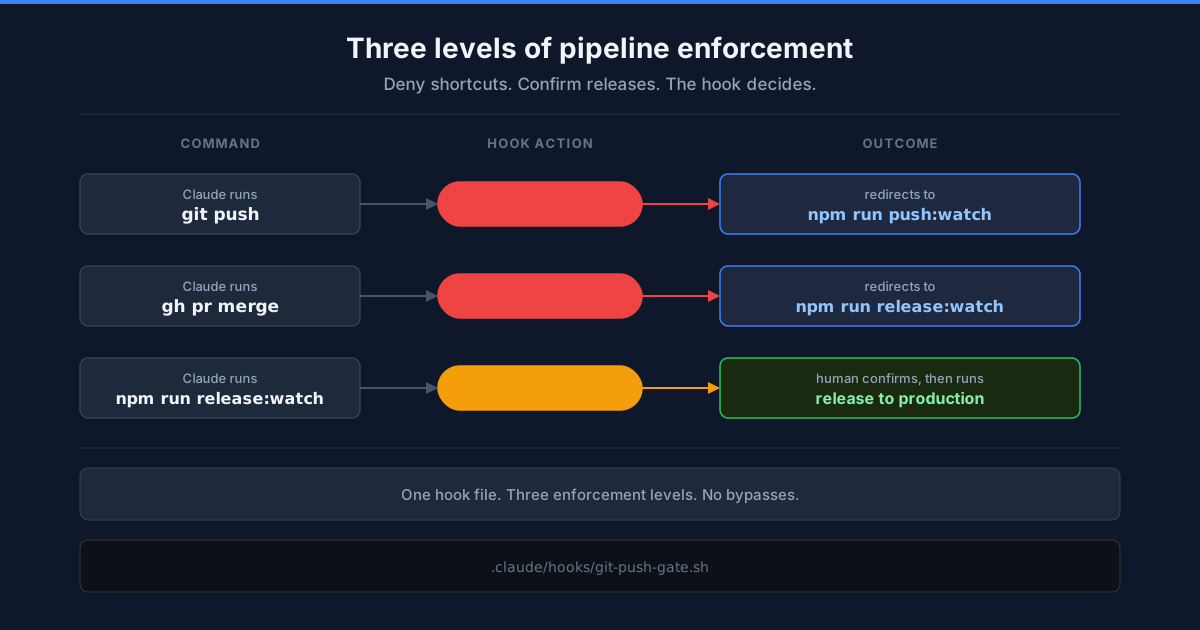
Claude Code has a hook system that can enforce this at the point where an AI agent is about to run a command. I use it to intercept three commands: git push is denied and redirected to a pipeline-watching script, gh pr merge is denied and redirected to a release-watching script, and npm run release:watch requires human confirmation before it runs.
The implementation here uses GitHub Actions, Netlify, and Changesets on a trunk-based workflow. The hook pattern works with any CI provider and deploy target. The watching script is the part that changes. The hook itself is just regex matching and JSON output.
The hook
Claude Code hooks are shell scripts that fire before or after tool calls. PreToolUse runs before the tool executes and can deny it entirely.
The hook lives in .claude/hooks/git-push-gate.sh and is wired into .claude/settings.json:
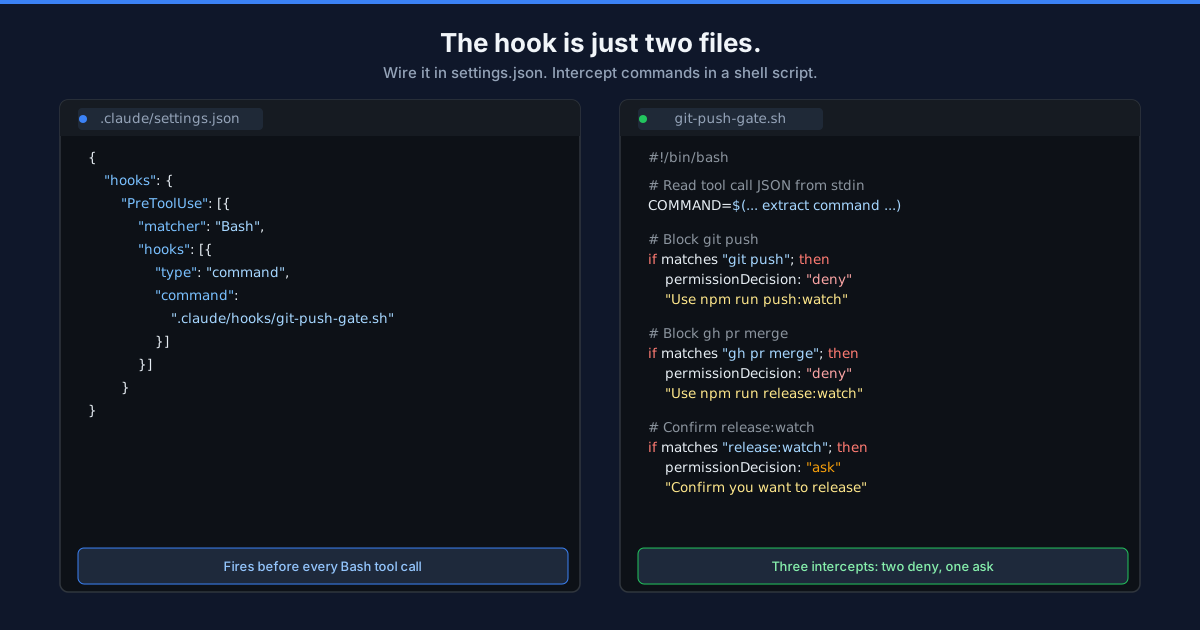
{
  "hooks": {
    "PreToolUse": [
      {
        "matcher": "Bash",
        "hooks": [
          {
            "type": "command",
            "command": ".claude/hooks/git-push-gate.sh"
          }
        ]
      }
    ]
  }
}
The script receives the tool call as JSON on stdin. It checks whether the command is a bare git push and, if so, returns a denial:
INPUT=$(cat)

COMMAND=$(echo "$INPUT" | python3 -c "
import sys, json
data = json.load(sys.stdin)
print(data.get('tool_input', {}).get('command', ''))
" 2>/dev/null || echo "")

if echo "$COMMAND" | grep -qE '(^|;|&&|\|\|)\s*git push(\s|$)'; then
  cat <<'EOF'
{
  "hookSpecificOutput": {
    "hookEventName": "PreToolUse",
    "permissionDecision": "deny",
    "permissionDecisionReason": "Use `npm run push:watch` instead of `git push`. It pushes, watches the pipeline, and surfaces either the release PR URL or the test deploy URL so you can review before releasing."
  }
}
EOF
  exit 0
fi
When Claude tries to run git push, it sees the denial reason and uses npm run push:watch instead. The hook requires no human involvement. It just reroutes the action.
What push:watch does
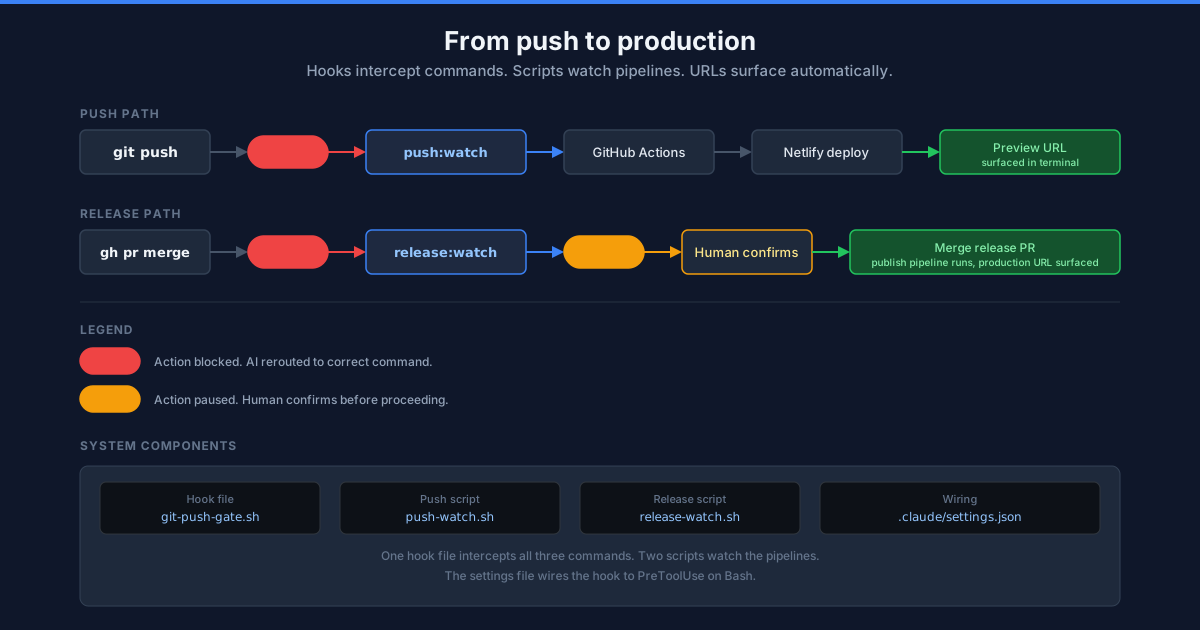
push:watch pushes, finds the pipeline run for the current commit SHA, watches it live in the terminal, and then surfaces the right URL:
- No pending changesets: shows the test deploy URL and exits. Nothing to release.
- Pending changesets: shows the test deploy URL, then finds and watches the
release-pr-previewworkflow, then outputs the preview URL and release PR link.
The end state is always: here is the URL to look at, here is where to merge if you're satisfied.
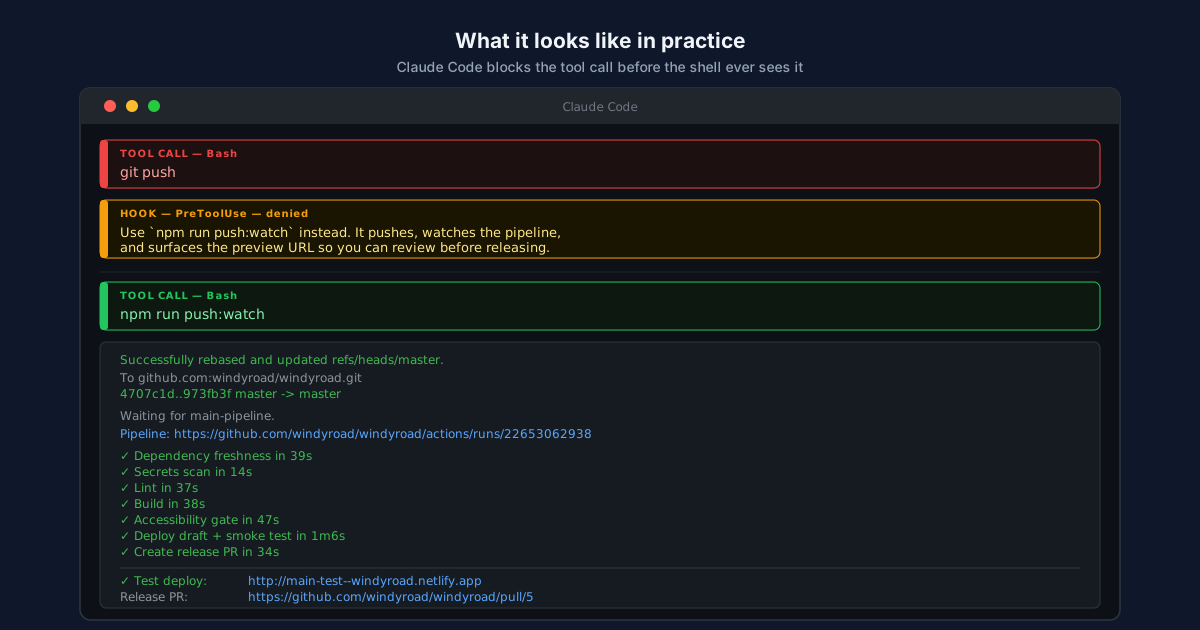
The script is wired into package.json as "push:watch": "bash scripts/push-watch.sh". Here's the full implementation:
#!/bin/bash
set -euo pipefail

SITE_ID="${NETLIFY_SITE_ID:-d00c9942-3c2a-420d-9486-0339ae54af4d}"

show_failure_guidance() {
  local run_id="$1"
  local run_url="$2"

  echo ""
  echo "Failed checks:"
  gh run view "$run_id" --json jobs \
    --jq '.jobs[] | select(.conclusion == "failure") | "  ✗ \(.name)"' 2>/dev/null || true

  echo ""
  echo "Fix the failure above, then re-run: npm run push:watch"
  echo ""
  echo "Ask Claude: 'What pre-push or pre-commit git hook in .githooks/ could"
  echo "have caught the failure in $run_url ?'"
}

# Pull + push
STASHED=0
if ! git diff --quiet || ! git diff --cached --quiet; then
  git stash
  STASHED=1
fi
git pull --rebase
[ "$STASHED" = "1" ] && git stash pop
PUSH_TIME=$(date -u +%Y-%m-%dT%H:%M:%SZ)
git push "$@"
COMMIT_SHA=$(git rev-parse HEAD)
REPO=$(gh repo view --json nameWithOwner -q .nameWithOwner)

# Find the main-pipeline run for this commit
printf 'Waiting for main-pipeline'
RUN_ID=""
for i in $(seq 1 30); do
  RUN_ID=$(gh run list \
    --workflow=main-pipeline.yml \
    --branch master \
    --limit 10 \
    --json databaseId,headSha \
    --jq ".[] | select(.headSha == \"$COMMIT_SHA\") | .databaseId" 2>/dev/null | head -1)
  [ -n "$RUN_ID" ] && break
  printf '.'
  sleep 2
done
echo ""

[ -n "$RUN_ID" ] || { echo "✗ Could not find pipeline run for $COMMIT_SHA" >&2; exit 1; }
RUN_URL="https://github.com/$REPO/actions/runs/$RUN_ID"
echo "Pipeline: $RUN_URL"

# Watch it
if ! gh run watch "$RUN_ID" --exit-status; then
  echo "✗ Pipeline failed — $RUN_URL"
  show_failure_guidance "$RUN_ID" "$RUN_URL"
  exit 1
fi

# Surface test deploy URL
TEST_URL=$(netlify api listSiteDeploys --data "{\"site_id\": \"$SITE_ID\", \"per_page\": 20}" 2>/dev/null | \
  jq -r --arg t "main-$COMMIT_SHA" '.[] | select(.title == $t) | .deploy_url' | head -1)
[ -n "$TEST_URL" ] && [ "$TEST_URL" != "null" ] \
  && echo "✓ Test deploy:  $TEST_URL" \
  || echo "  (test deploy URL not found — check Netlify dashboard)"

# Check for a pending release PR
PR_JSON=$(gh pr list --base publish --state open --limit 1 --json number,url 2>/dev/null)
PR_NUMBER=$(echo "$PR_JSON" | jq -r '.[0].number // empty')
PR_URL=$(echo "$PR_JSON" | jq -r '.[0].url // empty')

if [ -z "$PR_NUMBER" ]; then
  echo "No pending changesets — nothing to release."
  echo ""
  echo "CLAUDE: Show the user the test deploy URL above so they can review it."
  exit 0
fi

echo "  Release PR:   $PR_URL"

# Find and watch the release-pr-preview run triggered by this push
printf 'Waiting for release-pr-preview'
PREVIEW_RUN_ID=""
for i in $(seq 1 60); do
  PREVIEW_RUN_ID=$(gh run list \
    --workflow=release-pr-preview.yml \
    --limit 10 \
    --json databaseId,createdAt 2>/dev/null | \
    jq -r --arg since "$PUSH_TIME" \
    '[.[] | select(.createdAt > $since)] | sort_by(.createdAt) | reverse | .[0].databaseId // empty')
  [ -n "$PREVIEW_RUN_ID" ] && [ "$PREVIEW_RUN_ID" != "null" ] && break
  printf '.'
  sleep 3
done
echo ""

PREVIEW_RUN_URL="https://github.com/$REPO/actions/runs/$PREVIEW_RUN_ID"
if ! gh run watch "$PREVIEW_RUN_ID" --exit-status; then
  echo "✗ Preview pipeline failed — $PREVIEW_RUN_URL"
  show_failure_guidance "$PREVIEW_RUN_ID" "$PREVIEW_RUN_URL"
  exit 1
fi

# Surface preview URL
PREVIEW_URL=$(netlify api listSiteDeploys --data "{\"site_id\": \"$SITE_ID\", \"per_page\": 20}" 2>/dev/null | \
  jq -r --arg t "release-pr-$PR_NUMBER" '.[] | select(.title == $t) | .deploy_url' | head -1)

[ -n "$PREVIEW_URL" ] && [ "$PREVIEW_URL" != "null" ] \
  && echo "✓ Release preview: $PREVIEW_URL" \
  || echo "  (preview URL not found — check PR comments)"
echo "  Release PR:      $PR_URL"
echo ""
echo "Review the preview, then merge the PR when satisfied."
echo "Run: npm run release:watch"
echo ""
echo "CLAUDE: Show the user the release preview URL and release PR URL above so they can review and merge."
Two implementation details worth noting. First, the git pull --rebase is preceded by a conditional stash — git stash before the rebase, git stash pop after — but only if there are actually local changes. Running git stash pop with no stash entry fails, so the flag guards against that.
Second, when looking for the release-pr-preview run, the script records the push timestamp and filters for runs created after that time. Without this, it would immediately find the previous run (already completed) and watch that instead of the new one. The filter uses ISO 8601 string comparison. It works, but only if you pipe through standalone jq rather than using the gh run list --jq flag, which doesn't accept --arg parameters.
The CLAUDE: prefixed lines in the script output are directives for the AI agent. They appear in the conversation context when the script runs. Claude Code doesn't treat them specially. They work because any text the AI sees can influence its next response. A labelled directive makes the intent explicit.
If either pipeline fails, the script shows which checks failed and prompts:
Failed checks:
  ✗ Accessibility gate

Fix the failure above, then re-run: npm run push:watch

Ask Claude: 'What pre-push or pre-commit git hook in .githooks/ could
have caught the failure in https://github.com/.../actions/runs/...'
This is the loop I care about. When CI catches something, the question isn't just "how do I fix this?" It's "how do I make sure this gets caught before CI next time?" The failure message makes that question explicit.
Why hooks for this, not just instructions
You could tell Claude "always use npm run push:watch instead of git push." It would probably comply most of the time. But instructions drift. A long context window, a new session, a pasted snippet with git push in it. There are many ways an instruction gets forgotten.
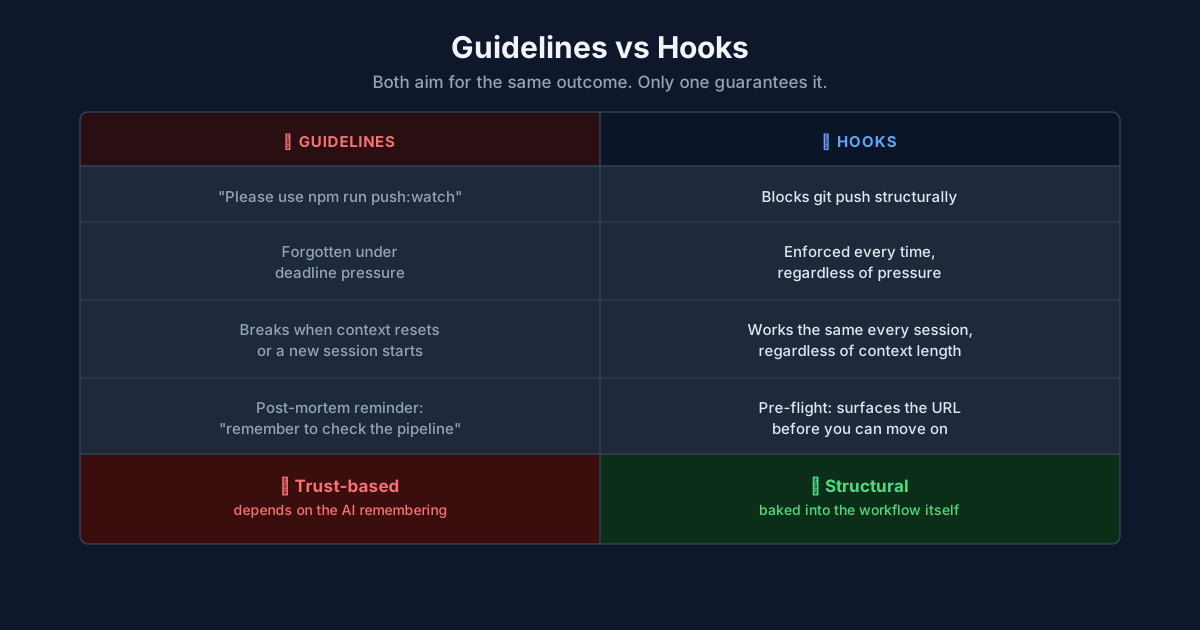
A hook fires on every Bash tool call, checks the command, and denies it if it matches. It doesn't care about context length or session state. The AI can't bypass it by forgetting.
This is the same principle as the pipeline itself. The release PR is the only path to production, and the preview URL is right there in the PR so opening it is one click. The hook enforces the equivalent thing locally: watching the pipeline isn't a habit you have to remember, it's the only path available.
Confirming before releasing
The push gate blocks git push and gh pr merge, redirecting to push:watch and release:watch respectively. But without a further check, the AI can run release:watch on its own. In projects without this hook, the AI sees a stale release PR, decides now is a good time to merge, and runs the release command autonomously. The human review step gets bypassed.
The fix is permissionDecision: "ask". The AI can propose the release, but Claude Code pauses and waits for human confirmation before running the command.
The same hook intercepts npm run release:watch and returns permissionDecision: "ask" instead of "deny":
if echo "$COMMAND" | grep -qE '(^|;|&&|\|\|)\s*npm run release:watch(\s|$)'; then
    cat <<'EOF'
{
  "hookSpecificOutput": {
    "hookEventName": "PreToolUse",
    "permissionDecision": "ask",
    "permissionDecisionReason": "About to run `npm run release:watch`, which merges the release PR and publishes to production. This is a release. Confirm you want to proceed."
  }
}
EOF
    exit 0
fi
"deny" blocks the action and the AI never runs it. "ask" pauses and prompts the user for confirmation. Claude Code shows the reason text and waits for a yes or no. The AI cannot proceed without human approval.
This is not a theoretical risk. In projects without this hook, the AI sees a WIP nudge saying a release PR has been open for three days, finishes its current task, and runs the release. The human never confirms. The "ask" hook closes that gap.
The broader pattern
Hooks compose. This project uses several, each enforcing a different constraint:
- Pipeline discipline (this article):
PreToolUseonBashinterceptsgit push(deny),gh pr merge(deny), andnpm run release:watch(ask). Three commands, one hook file, two enforcement levels. - Voice and tone enforcement:
PreToolUseonEdit/Writeblocks changes to copy files until a voice-and-tone reviewer has checked the proposed text against a written guide. - WIP visibility:
UserPromptSubmitsurfaces uncommitted changes, unpushed commits, missing changesets, and stale release PRs as nudges. No blocking. - Secret scanning:
PreToolUseonEdit/Writescans for API keys and tokens before any file is written. - Project health:
UserPromptSubmitruns a health check before every prompt.
Each hook is independent. They don't know about each other. They all fire on their respective events and stay silent when they have nothing to say.
The pattern scales to any constraint you want to enforce. If the AI shouldn't do something without checking first, there's a hook event for it. If you want the AI to see state without being blocked, additionalContext injects it. If you want human confirmation, permissionDecision: "ask" pauses and waits.
Adapting this for your project
Start with the command you want to intercept. If your deployment goes through a specific CLI command, wire a PreToolUse hook on Bash that matches it. If your release is a merge to a specific branch, match gh pr merge or whatever merge command your workflow uses.
Choose the right enforcement level. Use "deny" for actions the AI should never take directly (bare git push, manual merges). Use "ask" for actions that are correct but consequential (releasing to production). Use additionalContext in UserPromptSubmit for state you want visible without blocking (WIP accumulation, health checks).
If you use a different CI provider (GitLab CI, CircleCI, Jenkins), the hook and the watching script both change but the pattern stays the same: intercept the push, watch the pipeline, surface the result. Replace gh run watch with your provider's equivalent.
Keep the hook fast. It runs on every Bash tool call, not just pushes. The regex match and JSON output add negligible time. The watching script can take as long as the pipeline needs.
Hooks fail silently by default. If the hook script exits non-zero or produces invalid JSON, Claude Code logs a warning and lets the tool call proceed. This is safe for nudge hooks (the worst case is a missing warning) but dangerous for gate hooks (the worst case is an unblocked action).
Guard against this. The python3 calls in git-push-gate.sh are wrapped in 2>/dev/null || echo "" so a missing Python installation produces an empty string rather than crashing the script. The exit 0 at the end of the script is a catch-all: if no pattern matches, the command runs normally.
If Claude Code's hook execution model changes, your hooks still work as long as they read JSON from stdin and write JSON to stdout. The contract is the JSON schema, not the shell. Pin your expectations to the hooks documentation, not to observed behavior.
The full hook configuration for this site is in the public repo at github.com/windyroad/windyroad. The Claude Code hooks documentation covers the full event model.
Keep following The Shift
A practical newsletter about AI engineering, software delivery, and the systems around them.